Kollaborate Server 2.7.1 - more customization, restore deleted files, print view and more
Kollaborate Server 2.7.1 adds some great new features and changes to our self-hosted workflow platform.
Server-specific changes
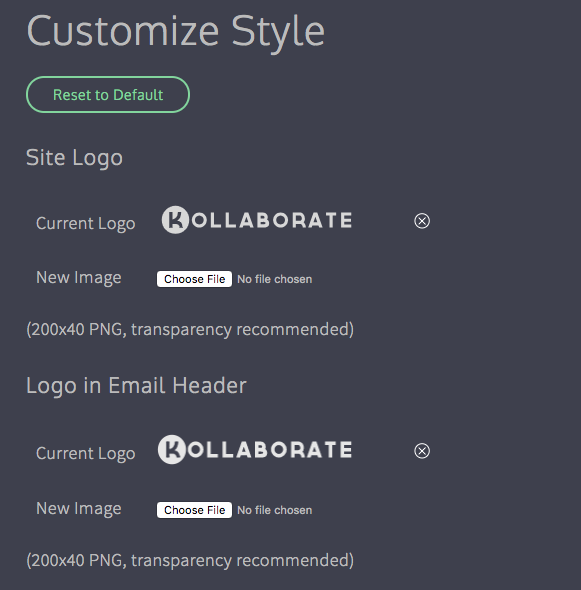
More style customization
You can now customize more of the UI and even use different logos for the site and email headings if you choose.
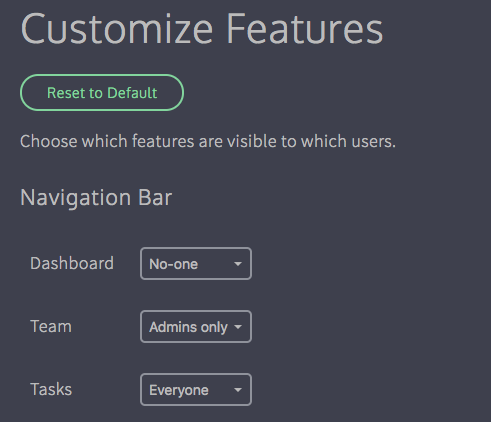
Disable features
You can now hide pages completely or only make them available to admins. So for instance if you never use the Dashboard feature it can now be hidden from the UI.
You can also hide features from the player page such as making it so that only admins can see viewing statistics.
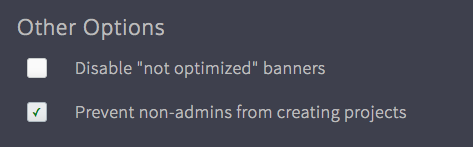
Prevent non-admins from creating projects
By default everyone has the ability to create a project. You can now limit this to site admins only from the Configure page of the admin area.
Other changes
Kollaborate Server 2.7.1 has the same features as the cloud version, including:
Restore deleted files and projects
Files are no longer deleted instantly and can now be restored by an admin for up to 14 days. To view deleted files, click the Show dropdown at the top right of the Files page and select Deleted Files (note: only admins can see this option).

Deleted projects can be restored by choosing Deleted Projects from the dropdown at the top right of the Projects page. You will only see projects you created here and they can be restored for up to 14 days.
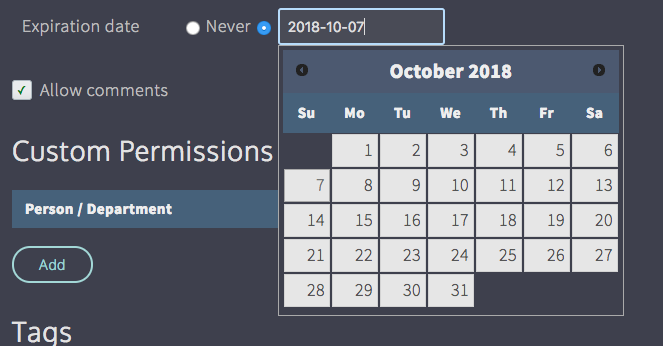
File expiration
To protect your content, files can now be given an expiration date from the Metadata page. The file will be deleted once this date passes, but can be restored by an admin for up to 14 days.
Comment print view
You can now view comments in a printable view complete with thumbnails. To do this, click Actions in the player, then go to Export Comments and choose Print. 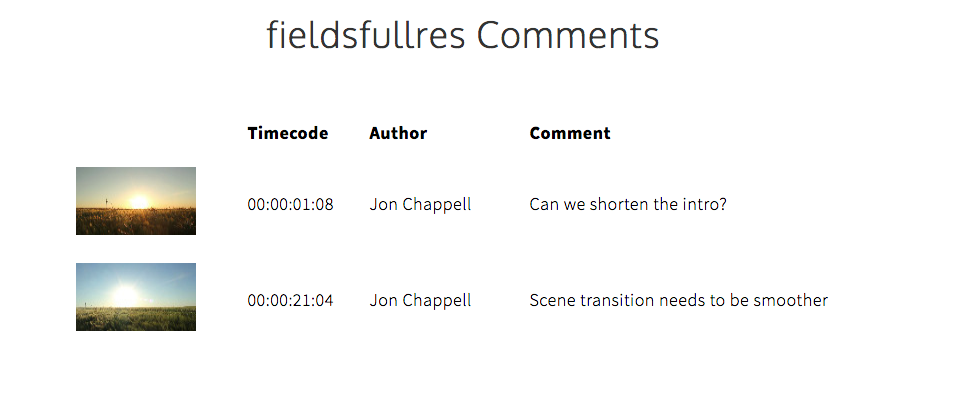
New Share options
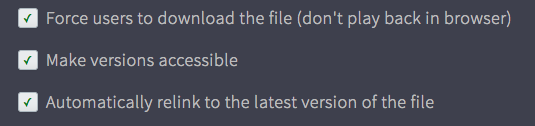
There are two new options on the Share page:
Force users to download - This forces the user to download the file instead of playing it in the browser. This is useful for situations where you don't intend to keep a file up for a long time and want to make sure the client downloaded it before it gets deleted.
Automatically relink to latest version - In earlier versions of the site, if you sent out a link and allowed the user to view all versions, the link would still default to the version it was originally linked to even when newer versions exist. This option makes sure that the first file shown is the latest version but still gives the option to view earlier versions.
There is also a new option when emailing a link to send the password in a separate email. This was requested by users who were concerned about link recipients forwarding the link to others.
New Workflows
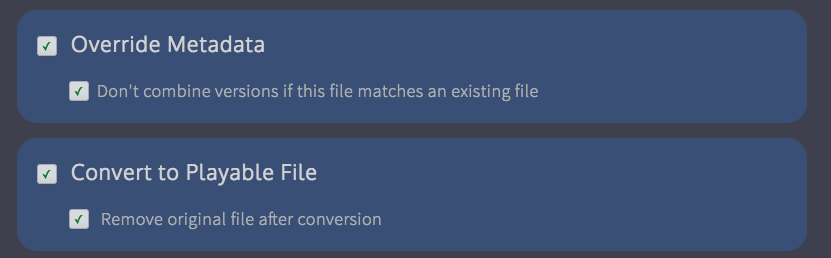
There are two new Upload Workflow actions:
Don't combine versions - This prevents the uploaded file from being part of a version stack, even if the filename matches that of an existing file in the folder. Files will always be independent with this option switched on.
Remove original file after conversion - This automatically deletes the original file after it has been converted by our encoding servers and replaces it with the highest-quality proxy. This is useful for saving storage space. Note that deleted original files cannot be restored by the new file restoration features.Â
There is also a new File Workflow action:
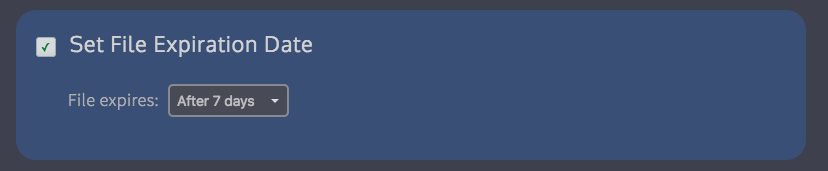
Set file expiration date - This allows you to automatically change the file's expiration date. This is very useful for creating content lifecycles - you can now create multiple File Workflows and set expiration settings automatically depending on the file's sensitivity or importance.Â
Kollaborate Encoder 1.3
There is also a corresponding update to Kollaborate Encoder. You must install this version if using Kollaborate Server 2.7.1 as older versions are not compatible.
Changes include support for password-protecting encoders and better support for image and multi-track audio files.
Full release notes for Kollaborate Server 2.7.1 and Kollaborate Encoder 1.3 are available on the Updates page or on the Kollaborate Server page after logging in.
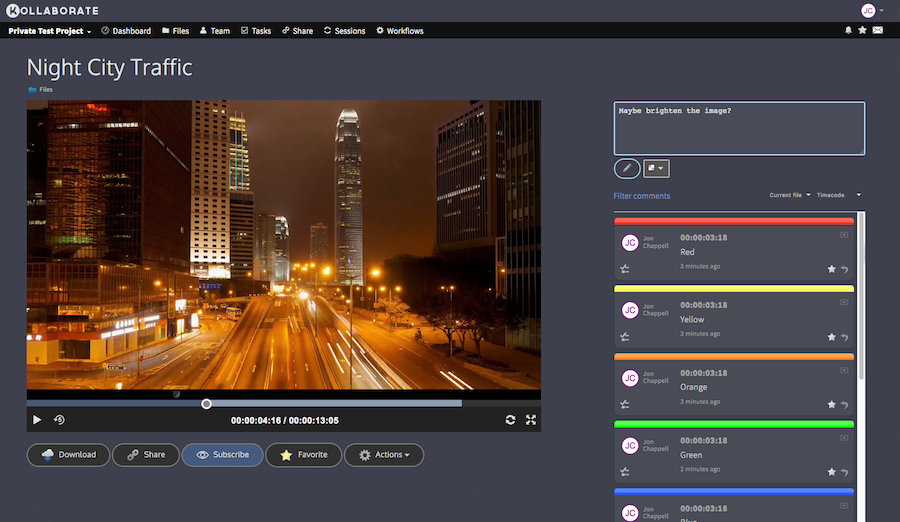
Kollaborate is an essential cloud workflow platform that allows you to share files with clients and team members while integrating with Digital Rebellion apps and services. Kollaborate Server allows you to host the platform in-house on your own servers and storage. To find out more, see the Kollaborate Server overview or register for the free cloud trial (Server trials are available on request).
Posted by Jon Chappell on Oct 18 2018 to
Kollaborate,
Front Page News,
DR NewsPermalinkKollaborate 2.7.1 - restore deleted files/projects, file expiration, print view, Incognito Mode and more
Kollaborate 2.7.1 is now live on the cloud, with lots of great new features.
Restore deleted files and projects
Files are no longer deleted instantly and can now be restored by an admin for up to 14 days. To view deleted files, click the Show dropdown at the top right of the Files page and select Deleted Files (note: only admins can see this option).

Deleted projects can be restored by choosing Deleted Projects from the dropdown at the top right of the Projects page. You will only see projects you created here and they can be restored for up to 14 days.
File expiration
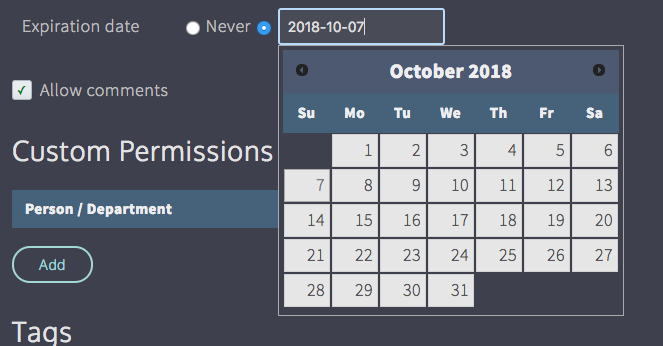
To protect your content, files can now be given an expiration date from the Metadata page. The file will be deleted once this date passes, but can be restored by an admin for up to 14 days.
Comment print view
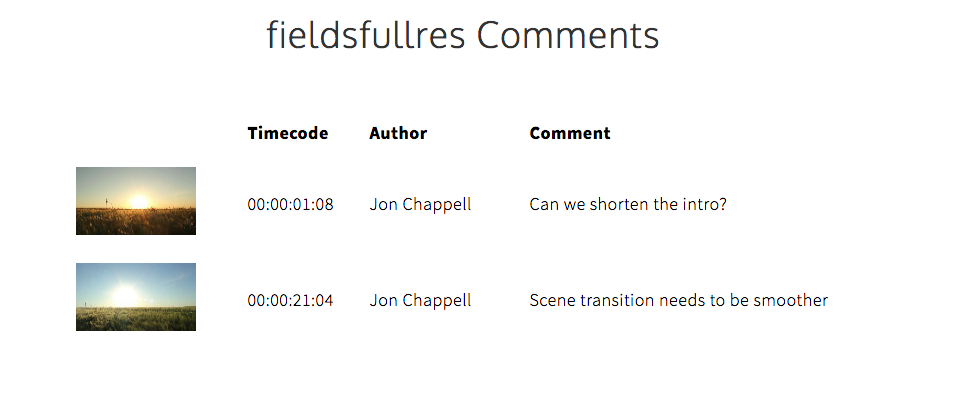
You can now view comments in a printable view complete with thumbnails. To do this, click Actions in the player, then go to Export Comments and choose Print.Â
Linked accounts can now see all projects
When linking a subscription to your account from the Linked Accounts page, you can now choose whether the user can automatically access all projects you create. If this box is unchecked, they will be able to create new projects but will need to be specifically added to the Team page of each project in order to see them.Â
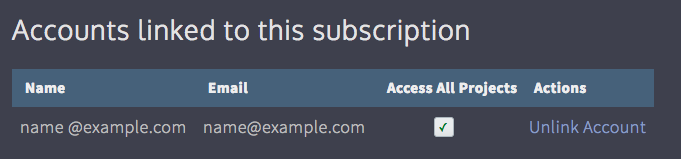
Note: users linked in this way will become admins on every project.
New Share options
There are two new options on the Share page:
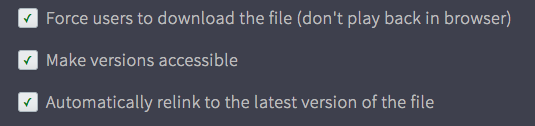
Force users to download - This forces the user to download the file instead of playing it in the browser. This is useful for situations where you don't intend to keep a file up for a long time and want to make sure the client downloaded it before it gets deleted.
Automatically relink to latest version - In earlier versions of the site, if you sent out a link and allowed the user to view all versions, the link would still default to the version it was originally linked to even when newer versions exist. This option makes sure that the first file shown is the latest version but still gives the option to view earlier versions.
There is also a new option when emailing a link to send the password in a separate email. This was requested by users who were concerned about link recipients forwarding the link to others.
New Workflows
There are two new Upload Workflow actions:
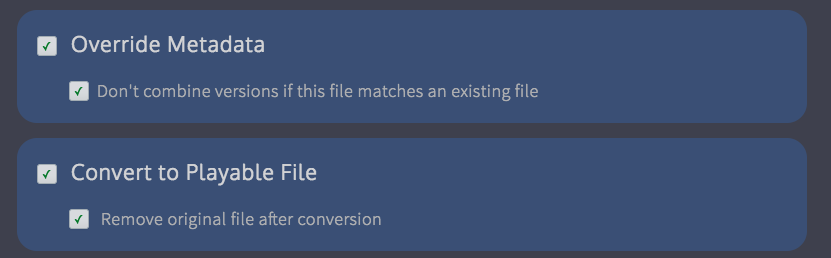
Don't combine versions - This prevents the uploaded file from being part of a version stack, even if the filename matches that of an existing file in the folder. Files will always be independent with this option switched on.
Remove original file after conversion - This automatically deletes the original file after it has been converted by our encoding servers and replaces it with the highest-quality proxy. This is useful for saving storage space. Note that deleted original files cannot be restored by the new file restoration features.Â
There is also a new File Workflow action:
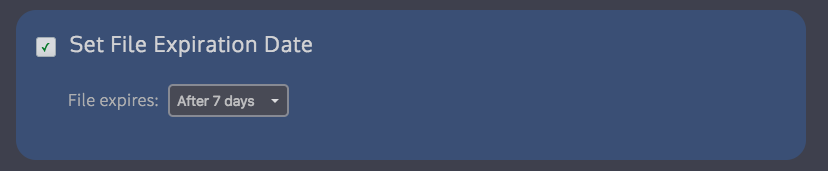
Set file expiration date - This allows you to automatically change the file's expiration date. This is very useful for creating content lifecycles - you can now create multiple File Workflows and set expiration settings automatically depending on the file's sensitivity or importance.Â
Improved Adobe panel UI
We've improved the UI for the Adobe panel to make it easier to download files and import markers.Â
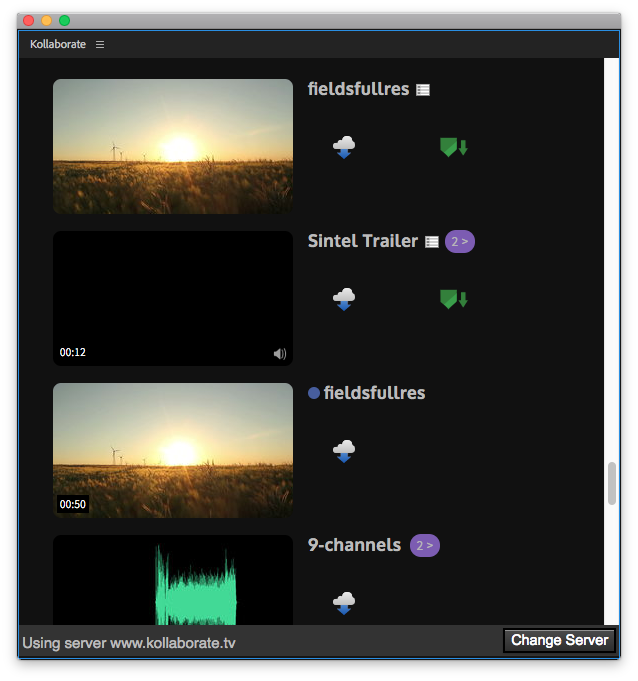
Note that this is a server-side change so you don't need to update the panel plugin itself.
Incognito Mode
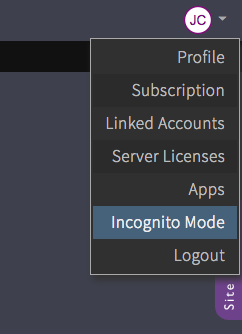
We've renamed the previous Disable Alerts option to Incognito Mode to make its function more obvious.
Incognito Mode allows you to prevent your actions on the site (e.g. uploading a file or making a comment) from sending email alerts to others on the project. It is available by clicking your avatar at the top right of the screen and toggling Incognito Mode.
Unviewed folder icons
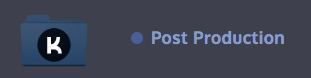
This is one of those very simple small changes that can make a big difference. You will now see a blue circle next to folders that contain unviewed files. This can be really useful when working on a big project where lots of changes are happening, so you can just follow the blue dots to find files you haven't looked at yet.
Other changes
- No more black thumbnails - Kollaborate now rejects black frames or frames with little information (like slates) so that thumbnails are more representative
- Storage space now updates dynamically in the bottom right corner when uploading or deleting files
- Views and downloads are now logged on a per-user basis and shown in the Users tab of the player
- Quick Look shows the name of the file at the top
- Quick Look automatically switches to the selected file when user selects a new file with the mouse and closes when files are deselected
- Quick Look - Added a button to open file in player
- Subscribers can change ownership of a project to themselves if it is owned by another user linked to their subscription
- Files - You can now see whether a file has been favorited without needing to hover over it
- Files - Improved resizing of the file table on smaller screens
- Files - Added a button to clear the current search
- Files - You can now choose to go back to the source folder when moving files instead of being taken to the destination
- Player - Individual views / downloads are now visible in the History tab
- Tightened permissions so that non-admins cannot move others' files and you now need upload permissions in order to create a folder.
In addition, we have conducted some server upgrades to make the site faster and more responsive.
Kollaborate is an essential cloud workflow platform that allows you to share files with clients and team members while integrating with Digital Rebellion apps and services. Kollaborate Server allows you to host the platform in-house on your own servers and storage. To find out more, see the Kollaborate Server overview or register for the free cloud trial (Server trials are available on request).
Posted by Jon Chappell on Oct 3 2018 to
DR News,
Front Page News,
KollaboratePermalinkKollaborate 2.7 - Embed LUTs, watermarks and overlays; folder uploading; view limits; Resolve marker import/export
Kollaborate 2.7 is a major update to our cloud workflow platform for sharing files and working more effectively with your team.
Upload Workflows
We've expanded our Workflows feature to include Upload Workflows. Upload Workflows are a new type of Workflow that allow you to set certain actions to occur when uploading a new file. You can choose whether to convert the file to a playable format, add LUTs and watermarks, and burn in data like timecode or the project name over the frame. This works for both videos and still images.

Upload Workflows can be limited to apply only to certain folders, which allows you to setup different rules depending on the folder the file is uploaded to. For example, you could choose to apply LUTs to files uploaded to a Dailies folder and watermarks to files uploaded to a Client Review folder.

You can also use Upload Workflows as a way of validating uploads. So if you require your deliverables to be uploaded as 1080p, you can set an upload workflow to apply a file workflow that will highlight the file red if it is a different resolution.
Upload Workflows are very powerful and we plan to release some videos soon showing more things you can do with them.
Send out a link from a File Workflow
What were previously known as Workflows are now called File Workflows to differentiate them from Upload Workflows. You can now automatically email out a link from a File Workflow, which will allow you to do things like automatically send a link to the client after your team has approved the file.

Trigger workflows from Tasks
Tasks can now trigger File Workflows when they are completed. This would allow you to, for example, sort task deliverables into a Tasks Completed folder after they are finished or allow others on your team to review them. You can trigger File Workflows for related files and deliverables separately.

Image conversion
Image files can now be converted to web-viewable formats by our encoding servers. There's a default Upload Workflow that will automatically convert unsupported images (e.g. BMPs or DPXs) to JPEGs when uploaded.

Workflow import / restore
Workflows can now be imported from other projects or restored back to the default versions.
(Note that Upload Workflows may not import in their entirety if they depend on files or custom departments that only exist in the other project.)Â

DaVinci Resolve marker import / export
Kollaborate can now import and export markers to Davinci Resolve as marker EDLs.
To import into Resolve, right-click on your timeline in the Media or Edit pane and go to Timelines > Import > Timeline Markers from EDL.Â

Folder uploading
Folders can now be dragged in to upload them. Kollaborate will respect the original folder structure and create subfolders accordingly.
Link recipients can now edit / delete their comments
Link recipients can now edit and delete their comments for up to 1 hour after posting.
View / upload limits for links
You can now specify how many times a link can be viewed or how many files can be uploaded to a File Request before the link will automatically expire. Links that have hit their expiration limit are highlighted in red on the Share page.Â

File History
You can now see the history of a file directly from the player.Â

Other changes
- Batch create aliases
- Batch favoriting from the Files page
- Added an option to hide the play icon overlay when a video is paused in Playback Settings
- Full-screen auto advance - if you are in full screen mode and Kollaborate is set to automatically advance to the next or previous file, full screen mode will be maintained when switching to the new file.
- Removed the comment submit button - press Enter to submit comments
- Tags are now duplicated when creating aliases
- Link expiration dates can now be removed after being set
- You can now opt out of being automatically subscribed to files you interact with (e.g. by commenting) from the Profile page
- File Request recipients are no longer asked for their name to improve the user experience. If the link is not sent through the site, their uploads will be tagged with their IP address
- You can now favorite, link and download files directly from the QuickLook dialog
- Many UI improvements and tweaks
- Lots of bug fixes
Kollaborate is an essential cloud workflow platform that allows you to share files with clients and team members while integrating with Digital Rebellion apps and services. To find out more, see the features page or register for the free trial.
Posted by Jon Chappell on May 9 2018 to
Kollaborate,
Front Page News,
DR NewsPermalinkKollaborate Server 2.6 - batch downloading, auto-advance, custom approval button labels and more
Last week we released Kollaborate Server 2.6, a major update to our self-hosted cloud workflow platform for video professionals.
This update contains some important new features but many of the best changes are the smaller ones. We really smoothed and polished a lot of things in this release and many tasks are faster and easier to accomplish than before.
Batch downloading
Select a group of files, then hit the download button next to one of them to download all of them at the same time. This works on the latest versions of Chrome, Firefox and Safari.

Auto-advance
Click the circle arrow to the left or right of the player to automatically advance to the next file in the folder after the current one finishes.

Download proxies
If the file has a lower-quality playable proxy, you will now be given the option of which file to download when clicking the download button in the player.

Custom approve/reject button labels
You can now give the Approve / Reject buttons in your workflows custom titles, allowing you to make it clearer what pressing a particular button will actually do.

Project thumbnails
Projects now show the icon of the most recent file that everyone can access. This only applies to files outside of departments.

Keep your place
If you click a file to view it and then press the Back button to go back to the Files page, Kollaborate now goes back to exactly where you were instead of going back to the top of the Files page. This is really useful if you were 20 pages deep.

Quick Look overhaul
We overhauled Quick Look to be more polished and responsive and increased the screen space it takes up so you can see your files better.

Improved image support
Large images are now displayed more prominently in the player and the image full-screen view has been redesigned and polished.
Additionally, we've improved support for animated GIFs, which now have frame rate, duration and hoverscrub thumbnails.
Security improvements
We've made a variety of security improvements. These will largely not be noticeable but one noticeable change is that you will need to re-login the first time after this update. After that the site will automatically log you in in future as normal.
Various uploading improvements
- Videos and images now show thumbnail previews during upload if the file is a format your browser can read
- Uploads now stay where you dragged them instead of scrolling you to the bottom of the page
- Estimated time remaining is now shown during uploads
- Lots of performance optimizations
Other changes
- New filter - show only Favorites on the Files page
- You can now favorite a file directly from the player
- The next / previous buttons in the player now show a preview of the upcoming file
- You can now separate version stacks by right-clicking them
- Folders are now ordered before files in the list
- Many UI tweaks
- Many performance optimizations and bug fixes
Kollaborate is an essential cloud workflow platform that allows you to share files with clients and team members while integrating with Digital Rebellion apps and services. Kollaborate Server allows you to host the platform in-house on your own servers and storage. To find out more, see the Kollaborate Server overview or register for the free cloud trial (Server trials are available on request).
Posted by Jon Chappell on Sep 18 2017 to
DR News,
Front Page News,
KollaboratePermalinkKollaborate 2.6 - batch downloading, auto advance, custom button labels and more
Last week we released Kollaborate 2.6, a major update to our cloud workflow platform for video professionals.
This update contains some important new features but many of the best changes are the smaller ones. We really smoothed and polished a lot of things in this release and many tasks are faster and easier to accomplish than before.
Batch downloading
Select a group of files, then hit the download button next to one of them to download all of them at the same time. This works on the latest versions of Chrome, Firefox and Safari.
Auto-advance
Click the circle arrow to the left or right of the player to automatically advance to the next file in the folder after the current one finishes.
Download proxies
If the file has a lower-quality playable proxy, you will now be given the option of which file to download when clicking the download button in the player.
Custom approve/reject button labels
You can now give the Approve / Reject buttons in your workflows custom titles, allowing you to make it clearer what pressing a particular button will actually do.
Project thumbnails
Projects now show the icon of the most recent file that everyone can access. This only applies to files outside of departments.
Keep your place
If you click a file to view it and then press the Back button to go back to the Files page, Kollaborate now goes back to exactly where you were instead of going back to the top of the Files page. This is really useful if you were 20 pages deep.
Quick Look overhaul
We overhauled Quick Look to be more polished and responsive and increased the screen space it takes up so you can see your files better.
Improved image support
Large images are now displayed more prominently in the player and the image full-screen view has been redesigned and polished.
Additionally, we've improved support for animated GIFs, which now have frame rate, duration and hoverscrub thumbnails.
Security improvements
We've made a variety of security improvements. These will largely not be noticeable but one noticeable change is that you will need to re-login the first time after this update. After that the site will automatically log you in in future as normal.
Various uploading improvements
- Videos and images now show thumbnail previews during upload if the file is a format your browser can read
- Uploads now stay where you dragged them instead of scrolling you to the bottom of the page
- Estimated time remaining is now shown during uploads
- Lots of performance optimizations
Other changes
- New filter - show only Favorites on the Files page
- You can now favorite a file directly from the player
- The next / previous buttons in the player now show a preview of the upcoming file
- You can now separate version stacks by right-clicking them
- Folders are now ordered before files in the list
- Many UI tweaks
- Many performance optimizations and bug fixes
Kollaborate is an essential cloud workflow platform that allows you to share files with clients and team members while integrating with Digital Rebellion apps and services. To find out more, see the overview or register for the free trial.
Posted by Jon Chappell on Aug 9 2017 to
DR News,
Front Page News,
KollaboratePermalinkKollaborate Transfer 1.5 - accelerated uploads and faster batch encoding
We recently released an update to Kollaborate Transfer that should significantly improve the speed of batch processing.
Encoding behavior has been changed so that it will no longer wait for a file to finish uploading before encoding the next file in the list. Encoded files now enter a Waiting state and will start uploading immediately upon the previous upload finishing. This can reduce total queue time significantly for large batches or long videos.
 Additionally, we have now switched over to the accelerated upload system we recently activated on the cloud. This boosts upload speeds for everyone but is most noticeable for customers outside of the US.
Other changes:
Â
- Reduced situations where the queue could hang
- Fixed an issue that could cause some hoverscrub thumbnail frames to be black when processing large batches
- Reduced memory usage
- General bug fixes, tweaks and optimizations
Kollaborate is an essential cloud workflow platform that allows you to share files with clients and team members while integrating with Digital Rebellion apps and services. To find out more, see the overview or register for the free trial.
Â
Posted by Jon Chappell on May 17 2017 to
Kollaborate,
Front Page News,
DR NewsPermalinkKollaborate Server 2.5 - Workflows, File Requests, Subtitles, Color Coding and more
We've just released a major new update to our Kollaborate Server self-hosted workflow platform for video professionals, with a lot of new features and important changes. This follows on from the update we recently released on the cloud.
Workflows
Workflows are an extremely powerful new feature that tells Kollaborate to perform certain tasks on a file when it is assigned a specific workflow. The tasks can range from labelling or marking the file to moving it to a specific folder. It's an easy way of quickly sorting files so they are easier for your team to access.

They are also the new way of getting file approvals from other people on your team. This is considerably more powerful than before and allows you to target specific people or departments as being able to approve files, rather than everyone with approval rights. You can also specify that every single marked person must approve the file before it is considered approved, as opposed to the old system where it was approved simply by the first person to approve it.

Each approval workflow has options for running another workflow when it is approved or rejected, so you could for example run another workflow to automatically highlight approved files and move them to an Approved folder. It also means you can chain approvals together so that an approval on one workflow triggers another approval workflow, allowing a file to filter up to higher members of your team for a decision before it is finally approved.

Another way you could use this is to implement milestones. So Milestone 1 would move the file to a particular project or department, someone works on the file and they then assign it Milestone 2, which moves it onto someone else to work on. Then they assign it Milestone 3 which asks a manager to approve it and then if it is approved it is automatically assigned an Approved status which moves the file to an Approved Files folder.
That's just an example - you can set it up however you like and it's extremely flexible.
We have lots of plans for this in future and are keen to know how customers plan to incorporate this feature into their workflows.
Upload Requests
Need some files from a vendor but don't want to add the person to the project? Send them an upload link. Upload links work just like sharing links but show a file upload page instead of a video player.

Team overhaul
The Team page has been completely overhauled. Each department now has a text box at the bottom that allows you to type in an email address to invite a team member. This is a considerably quicker and simpler way of setting up your team than the previous version.

Positions have been replaced by Roles, which apply a set of default permissions to a user. In a future update you will be able to add your own roles.
Inviting new users to the service is easier than before. Rather than assigning the user a default password, they now receive an activation link. Upon clicking the link they will be asked to choose a password for their account. We feel this is a more user-friendly way of doing things that should result in fewer forgotten passwords. You can also choose to manually send a user the activation link rather than having Kollaborate send it if you want to add a personal message.
Another change is that departments are no longer required to have users inside them. This is useful if you just want a private storage area for Admins, as they are not required to be part of a department to see inside it.
Project muting
Don't want to receive alerts from a specific project but still receive alerts from others? You can now mute it. Hover over the project on the Projects page and click the bell icon next to its name.

Subtitle support
You can now view SRT subtitles in the video player. Here's how to do it:
- Upload both the video and SRT caption file to your project.
- Right-click on the video file on the Files page and click Relationship Editor or go to Actions > Related Files > Relationship Editor.
- Click New Relationship.
- Browse to the SRT file and choose Subtitles as the relationship type.
- Save and go back to the video. You'll now see a green icon at the bottom of the player that will allow you to toggle the captions on and off.
We plan to support additional caption formats in future.

Admin Dashboard

The Admin Dashboard shows you statistics about your installation including software versions and configuration information. It can also alert you to problems that have occurred.

A full list of changes is available here after logging in.

Kollaborate is an essential cloud workflow platform that allows you to share files with clients and team members while integrating with Digital Rebellion apps and services. Kollaborate Server allows you to host the platform in-house on your own servers and storage. To find out more, see the Kollaborate Server overview or register for the free cloud trial (Server trials are available on request).
Posted by Jon Chappell on Mar 23 2017 to
Kollaborate,
DR News,
Front Page NewsPermalinkKollaborate 2.5 - Workflows, File Requests, Subtitles, Color Coding and more
We've just released a major new update to our Kollaborate cloud workflow platform for video professionals, with a lot of new features and important changes.
Workflows
Workflows are an extremely powerful new feature that tells Kollaborate to perform certain tasks on a file when it is assigned a specific workflow. The tasks can range from labelling or marking the file to moving it to a specific folder. It's an easy way of quickly sorting files so they are easier for your team to access.
They are also the new way of getting file approvals from other people on your team. This is considerably more powerful than before and allows you to target specific people or departments as being able to approve files, rather than everyone with approval rights. You can also specify that every single marked person must approve the file before it is considered approved, as opposed to the old system where it was approved simply by the first person to approve it.
Each approval workflow has options for running another workflow when it is approved or rejected, so you could for example run another workflow to automatically highlight approved files and move them to an Approved folder. It also means you can chain approvals together so that an approval on one workflow triggers another approval workflow, allowing a file to filter up to higher members of your team for a decision before it is finally approved.
Another way you could use this is to implement milestones. So Milestone 1 would move the file to a particular project or department, someone works on the file and they then assign it Milestone 2, which moves it onto someone else to work on. Then they assign it Milestone 3 which asks a manager to approve it and then if it is approved it is automatically assigned an Approved status which moves the file to an Approved Files folder.
That's just an example - you can set it up however you like and it's extremely flexible.
We have lots of plans for this in future and are keen to know how customers plan to incorporate this feature into their workflows.
Upload Requests
Need some files from a vendor but don't want to add the person to the project? Send them an upload link. Upload links work just like sharing links but show a file upload page instead of a video player.
Team overhaul
The Team page has been completely overhauled. Each department now has a text box at the bottom that allows you to type in an email address to invite a team member. This is a considerably quicker and simpler way of setting up your team than the previous version.
Positions have been replaced by Roles, which apply a set of default permissions to a user. In a future update you will be able to add your own roles.
Inviting new users to the service is easier than before. Rather than assigning the user a default password, they now receive an activation link. Upon clicking the link they will be asked to choose a password for their account. We feel this is a more user-friendly way of doing things that should result in fewer forgotten passwords. You can also choose to manually send a user the activation link rather than having our system send it if you want to add a personal message.
Another change is that departments are no longer required to have users inside them. This is useful if you just want a private storage area for Admins, as they are not required to be part of a department to see inside it.
Project muting
Don't want to receive alerts from a specific project but still receive alerts from others? You can now mute it. Hover over the project on the Projects page and click the bell icon next to its name.
Subtitle support
You can now view SRT subtitles in the video player. Here's how to do it:
- Upload both the video and SRT caption file to your project.
- Right-click on the video file on the Files page and click Relationship Editor or go to Actions > Related Files > Relationship Editor.
- Click New Relationship.
- Browse to the SRT file and choose Subtitles as the relationship type.
- Save and go back to the video. You'll now see a green icon at the bottom of the player that will allow you to toggle the captions on and off.
We plan to support additional caption formats in future.
Other Changes
- File color coding
- Batch metadata editing
- New filters on the Files page - show unviewed, with comments, without comments, with revisions and since my last visit
- Metadata tags are now matched when searching from the Files page (previously you could only do this from the Advanced Search page)
- Previously if you wanted to see detailed viewing statistics about a link, you would need to send it via the site so it could match the stats to the user's email address. Now in cases where the link is emailed manually and Kollaborate doesn't know who clicked it, the site will show viewing statistics by IP address instead.
- If you're not viewing a playable file, the comment box is now selected by default to make note-taking easier
- Many UI changes plus an overhaul of the email skin
The site has also had a complete architecture overhaul where every single page was modified and optimized. We're also running on faster servers and cache data more aggressively which should result in the site being faster than before.
Kollaborate is an essential cloud workflow platform that allows you to share files with clients and team members while integrating with Digital Rebellion apps and services. To find out more, see the overview or register for the free trial.
Posted by Jon Chappell on Feb 15 2017 to
DR News,
Front Page News,
KollaboratePermalinkKollaborate Folder Watcher 1.2 - Finder progress bars and improved network drive support
Kollaborate Folder Watcher 1.2 is a significant update to our automatic file uploader for our Kollaborate cloud platform.
Finder progress bars
Based on your feedback, encoding and uploading now displays progress bars directly in Finder, allowing you to see at a glance the progress of any file.

Improved network drive support
Kollaborate Folder Watcher works by listening for messages from macOS that tell it when changes to a folder have occurred. These messages do not get sent on network drives so before now the app didn't work with such drives. Now it manually scans for changes too so it will detect changes on these drives, albeit with a delay compared to a local drive.
Kollaborate is an essential cloud workflow platform that allows you to share files with clients and team members while integrating with Digital Rebellion apps and services. To find out more, see the overview or register for the free trial.
Posted by Jon Chappell on Jan 17 2017 to
DR News,
Front Page News,
KollaboratePermalinkMassive storage boost for Kollaborate subscribers
We've given Kollaborate subscribers a massive free storage space boost. Kollaborate was already one of the best-value review platforms on the market due to the fact you get 5 team members and all features on the base plan, in addition to free access to several of our products, and this increases the value even more.
Additionally, our higher-level plans now come with unlimited team members.
| Plan |
Old Storage |
New Storage |
| Freelance |
25 GB |
30 GB |
| Small Business |
50 GB |
60 GB |
| Business |
75 GB |
100 GB |
| Production |
140 GB |
200 GB |
| Studio |
225 GB |
250 GB |
| Studio Plus |
400 GB |
500 GB |
| Network |
1 TB |
1.5 TB |
| Network Plus |
2 TB |
3 TB |
You can view the full list of package benefits, including pricing, here.
Kollaborate is an essential cloud workflow platform that allows you to share files with clients and team members while integrating with Digital Rebellion apps and services. To find out more, see the overview or register for the free trial.
Posted by Jon Chappell on Jan 10 2017 to
DR News,
Front Page News,
KollaboratePermalink
 KollaborateCloud platform for pro video
 Pro Maintenance ToolsMaintain, optimize and troubleshoot your editing system
 Pro Media ToolsMedia and workflow management for video pros
 CinePlayProfessional video player
 Post HasteCreate projects from customizable templates
 Preference ManagerTrash, backup, lock and restore preferences for your video apps
 FCS RemoverUninstall Final Cut Studio and FCPX
 Cut Notes
 CinePlay
 Aspect Ratio Matte Generator
 Video Space Calculator


 Additionally, we have now switched over to the accelerated upload system we recently activated on the cloud. This boosts upload speeds for everyone but is most noticeable for customers outside of the US.


